
Stay connected with the people who would come for you
A small group of people who agreed to come. Four ways to reach them. Nothing shared until something happens.
Android and Wear OS today · iPhone on its way to the App Store · Apple Watch in development
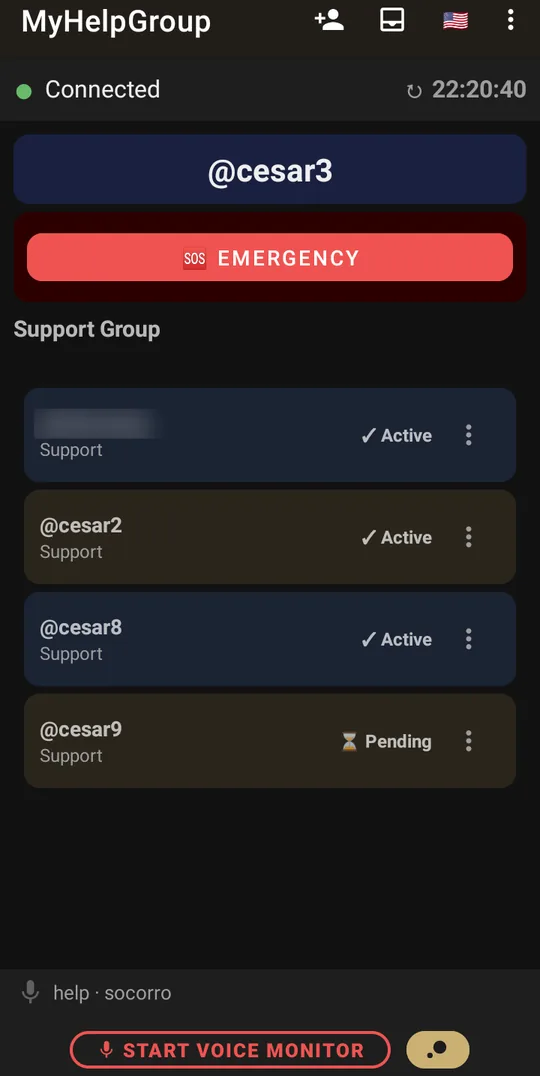
MyHelpGroup keeps a small group of people — family, neighbours, whoever you trust — aware that you are well, and lets them know quickly when you are not.
A watch on your wrist, and your family told at once
Most emergency devices sold today — the pendant or wristband with a panic button — call a monitoring centre. On the other end is an operator who does not know you: they have to reach you, work out what happened, and only then call your family or send for help. Every step costs minutes, and the people who would actually come for you are the last to know. With MyHelpGroup, a smartwatch on your wrist tells the people who would come directly — all of them at once, within seconds.
A typical device with a monitoring centre
- You press the button on the pendant.
- The centre receives the call and an operator picks up.
- The operator tries to talk to you and work out what happened.
- Only then do they call your family, or send for help.
- Whoever is told still has to find out where you are.
Someone in between you and the people who would come.
A watch with MyHelpGroup
- You hold SOS on the watch — or it notices a fall by itself.
- Five seconds to take it back, then the alert goes out.
- Within seconds your whole group receives it, even with the screen off: your position on the map and, right after, twenty seconds of your voice.
- Whoever is closest answers “on my way”; someone else calls for help already knowing where you are and what happened.
Nobody in between.
Why it is faster. The alert goes to people who know you, know where you live, have a key, and are minutes away. There is no queue, no confirmation call, no contact list worked through one by one: everyone is told at once, and the first person who can go, goes. Whoever cannot go calls the public emergency services already holding the address, the map and your voice — and you see on the watch who is coming.
It works away from home. There is no base station in the living room: the watch reaches our server on its own, over mobile data, over Wi-Fi or through the phone — in the street, at the shop, in the park.
It notices what you cannot ask for. On your wrist, the watch watches for a fall, a pulse that stops showing and a heart rate out of range, and opens the same five-second countdown.
And when you cannot set anything off: the schedule
A sudden illness does not always put you on the floor: fainting in an armchair, a stroke, a weakness that leaves no strength to press any button. That is what the schedule is for. You switch it on once and pick the times; from then on the watch — or the phone — asks if you are all right, and one tap answers. If nobody answers, the silence becomes the alert: with the four default tries, about ten minutes after the question your group receives an emergency with your position. And if the device itself runs out of battery or signal, our server notices it has gone quiet and tells your group anyway.
What the watch does · How the schedule works
Four ways to ask for help
Four, because the one that works is the one within reach when it happens — and you will not always be able to reach for the phone, or to speak.
You ask
One button — on the phone, or on the watch on your wrist. Five seconds to take it back if you pressed it by mistake, then everyone in your group knows and sees where you are. From the first second it records up to twenty seconds of your voice, so they also hear what happened.The phone — or the watch — notices
A fall, a car crash, a shout. Switch on the sensors you want and the phone watches for what you cannot say — and opens the same five seconds, with the same way to take it back. On your wrist, the watch adds its own: a fall, a pulse that stops showing, a heart rate out of range.
The schedule asks
At the times you choose, the phone — or the watch — asks whether you are all right. Silence is an answer too: if you never reply, the last try counts down five seconds and your group receives an emergency. And if the phone itself goes quiet — no battery, no signal — our server notices, and tells your group.
The night listens
With the phone beside you, it listens for the words you chose, and for a shout. Either one calls your group. While it listens nothing is recorded, and the sound never leaves the phone.The four are not four products. They are four ways of reaching the same people.
Twenty seconds to say what happened
A position says where you are. It does not say what happened. So from the moment the countdown opens, the phone — or the watch — records up to twenty seconds of your voice. Your group hears it in the app and by e-mail, and within about a minute they know what this is: a fall, a pain, a threat. And they can call you straight back, already knowing what to ask.
If you feel yourself slipping away. Those twenty seconds may be the last thing you manage to say — and a few words are enough: where you are, what you feel, how to get in. If you cannot speak at all, the sound around you goes instead.
I fell in the kitchen and I can’t get up. The key is under the mat.
Strong pain in my chest — call an ambulance. I’m at home.
I feel dizzy, I think I’m going to faint. I’m at the bakery on the corner.
Everything about the recording
When you cannot ask at all
You faint in the hallway. Or it happens too fast to reach for anything. If you live alone — or everyone is out — it could be hours, even days, before anyone notices that you have gone quiet.
This is what the schedule is for. At the times you chose, the phone — or the watch — asks whether you are all right, and one touch answers. Silence is an answer too. No reply, and it asks again three minutes later, and again — four times by default. Then the screen counts down five seconds, and your group receives an emergency: you did not respond to a safety check-in, and this is where you are. The twenty seconds of recording still happen; if you cannot speak, the sound of the room goes instead.
Choose the interval you can live with. The schedule cannot know when you fell — only when you stopped answering. Asked every hour, with the default four tries, the longest anyone could go without knowing is about an hour and ten minutes; every two hours, about two hours and ten. Fewer tries shorten the wait — with one, your group is told 35 seconds after the question — but leave less room for a question you simply did not hear. And between the questions the other ways keep watching: on your wrist, the watch notices a fall, or a pulse that stops showing, without waiting for the next check-in.
What it needs. The phone is what asks, so it has to be on, charged and with you — a phone left at the office asks nobody. Outside the window you set for each day it does not ask, so let the window cover the hours you are most often alone.
If the phone itself goes quiet. A phone that runs out of battery, loses its signal or breaks cannot ask — and cannot send the emergency either. So our server keeps watch too. It knows when your next check-in is due, and if no device of yours — phone or watch — has reported it 25 minutes after that time, your group receives an alert: you did not check in, and none of your devices answered. An alert, not an emergency — the cause is usually a flat battery — but someone will call you, or come by. When your phone is back and reports again, the alert closes by itself.
Who comes — your group
A group is the handful of people who agreed to come: family, a neighbour, a friend down the road. You invite them, each one accepts. Nobody is added without knowing, and nobody sees anything until something happens. One of them can hold the password to your phone’s settings, so a switch turned off by accident does not quietly stop the help.
What happens when they are called
Everyone is told at once — in seconds, even with their screens off. Each one answers where they stand: seen it · on my way · arrived. Whoever asked for help watches that board fill in, and knows who is coming. Your position travels with the alert and keeps updating while an emergency is open, so they can navigate to where you are now. Your voice follows a few seconds later — twenty seconds of it, to play in the app, and by e-mail to everyone in the group, you included.
On your wrist
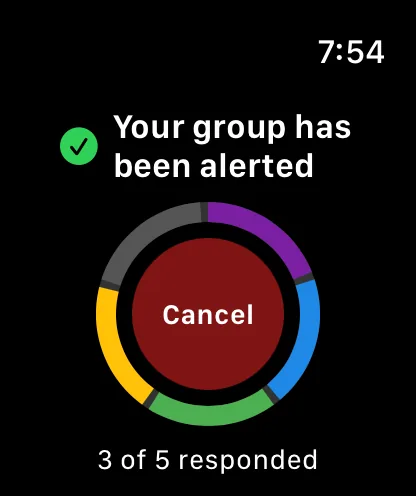
A watch with Wear OS carries the button, the check-in and sensors of its own when the phone is in another room. It reaches the server on its own — mobile network, Wi-Fi, or through the phone — and shows, in a coloured ring, how far your call for help has got.
On iPhone and Apple Watch
MyHelpGroup is on its way to the iPhone. It is the same app on the same server, so an iPhone and an Android phone can be in the same group and see the same board. The iPhone is stricter about what an app may do when it is not on screen, so a few things work differently there — we say which.
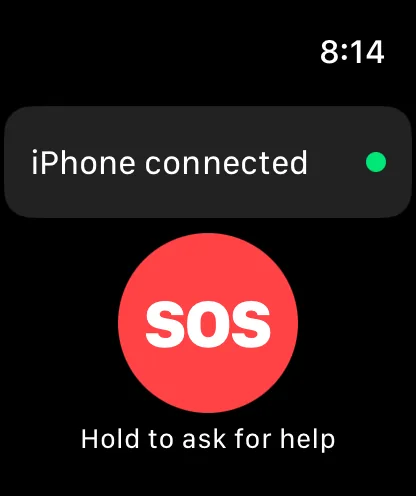
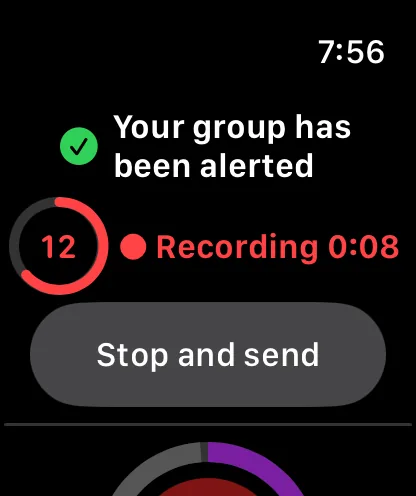
The Apple Watch app is in testing. It carries the SOS button, shows how the group is answering and, when the watch reaches our server by itself, records up to 20 seconds of voice. It works together with the iPhone. There is no date yet; until then, the watch on your wrist is a Wear OS watch.
And if there is no internet
A basement, a power cut at the mast, a plan that ran out. When an emergency cannot go over the internet, it goes as a text message to the people in your group whose number you linked — and their answers come back the same way, onto the same board. And if you would rather call, the app puts the numbers one touch away.
What travels, and where it stops
Your position, your choice
Privacy, taken seriously. Your position is shown only to your group — and to whoever they send the live location link to — and is never used for advertising or tracking. Two switches in the settings decide whether it is shared: one for the regular updates, one for emergencies. Both start on, and the choice applies to all your devices, the watch included.
Why we recommend keeping it on. With periodic sending on, your last position stays on record. If the signal drops or the battery dies, the alert and the emergency still show your group where you were last seen.
The honest limit. Without your position, your group — and the emergency services — may not know where you are. MyHelpGroup does not replace your local emergency number.
Your position, in the privacy policy · Where to switch it
What it is not
It is not a medical device, not a monitoring service, and not a substitute for calling emergency services. It tells people who already care about you that something happened.